My Book Logging Spreadsheet

If you read my last post about my TBR spreadsheet then you may have been anticipating this post. Or you may not. Either way, this is my spreadsheet for logging books that I have read. Essentially, it is my own version of Goodreads.

I took inspiration from the millions of places online that offer book logging spreadsheets and concocted my own. I even learnt a few new things about which formula to use for various functions. If I haven’t bored you to death with details about spreadsheets, please read on and find out what I did with this one.

MY BOOK LOG (This copy is view only due to it being my copy) – Click the link to see my copy in real time. I’ve backdated it as much as possible from the beginning of this year.

Onto the new spreadsheet details:
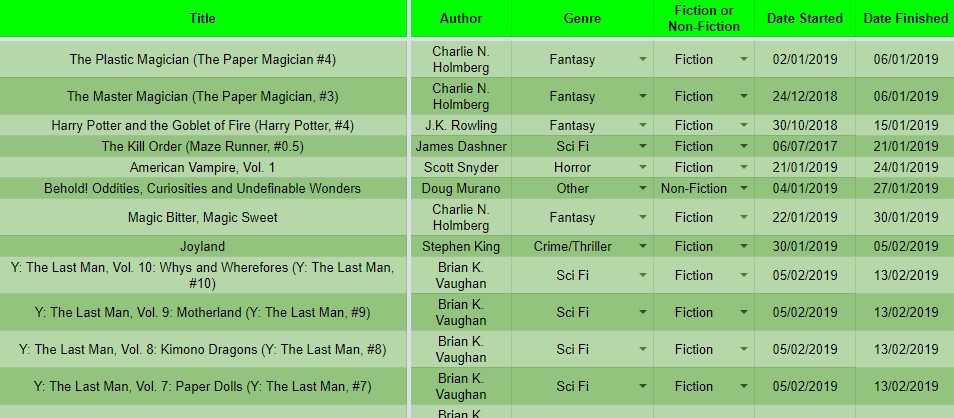
Screenshot_3

Picture One (above) and Picture Two (below) are pretty self-explanatory. They contain details about the books that I have read.
TITLEThe title of the book
AUTHORWho wrote the book
GENREThe book genre. I have provided quite a few in the drop-down list, the main genres of course and added an “other” for those that don’t quite fit anywhere. I’m well aware that “romance” and “comedy” may never get used but the option is still there
FICTION OR NON-FICTIONTo confirm if the book is fiction or non-fiction
DATE STARTED/DATE FINISHEDAre the dates I started and finished the book
MONTH READThe month I finished the book
PAGESTotal number of pages in the book
FORMATWhether the book was paperback, hardback, eBook, audiobook etc
YEAR PUBLISHEDPublication year of the book if known
M/F AUTHORThe gender of the author. “Other” is also an option if required
STAR RATING (OUT OF 5)How many stars I would give the book

Screenshot_4

This section of the main page (below) has an option to tick/check/select a box if the book was a DNF (I am a terrible DNFer now that I realised I shouldn’t struggle with a book) and a section for additional comments.

Screenshot_5

The second page on the spreadsheet is the stats page. It takes details from all the information input on the first page, and providing I don’t go over 2000 books, it will automatically update as more data is input.

Screenshot_6

The final section or page on the spreadsheet has the charts/graphs on. As with the stats page, these will automatically update providing none of the column/data cells from the stats page are moved.

Screenshot_7

MY BOOK LOG BLANK – This is a blank copy for you to use.

PLEASE “MAKE A COPY” OF THE DOCUMENT AS NOT DOING SO WILL MEAN THAT YOU ARE UPDATING YOUR INFORMATION ON THE ORIGINAL BLANK.

I’ve been 100% geeking out over this, managing to combine 2 out of my 3 obsessions is amazing. The only thing I’m wondering is how long will I stick with it.

My TBR of Owned Books

You may, or may not, already know but I am a hoarder. A book hoarder to be precise. I’m sure there are many of us out there and you all will understand. 

I buy books. I download free books on my kindle like there is no tomorrow and charity shop books are a definite yes for me! After all, why pay full price if you can get a slightly used copy for 50p.

After realising that I probably already own too many books for me to ever read in my lifetime, I decided I needed to try and read some of the books that I have already bought before buying any new ones. So far, I’m failing miserably at not buying books but I am trying my best.

On many websites, I had seen people that had a “Book Jar”. Basically, a jar, filled with pieces of paper. Each paper has a title of a book on it, pick one at random and read that. I liked this idea but I didn’t like the thought of writing out the titles of all of my 1000(approx) books that I owned. Then, I’d have to remember what format the book was in and locate it before reading.

I wanted somewhere that I could keep tabs on all my owned books (eBooks AND actual books). I know Goodreads has this feature available but I have a thing for spreadsheets. I always have. I have a spreadsheet for the bills and incoming money which I keep track of so I figured that I could use something similar for my books. Hence my “Books I Own TBR” was born. Between that, and a second spreadsheet – which I will be posting about at a later date – I have spent the best part of the last three days working through and creating spreadsheets. With formula and charts. Gotta keep those stats monitored.

This is my spreadsheet, up-to-date with all my currently owned books. The beauty of it is that I can continue to update it if I do happen to get any more books.

BOOKS I OWN TBR (This copy is “view only” as it’s my copy.)

The spreadsheet has two sheets which I will explain below.

Screenshot_1

This is the main “sheet” or data. As you can see, it is pretty self-explanatory. I wanted to keep it really simple as I knew I would have a lot of books to add to it. Importing that Amazon library was not an easy task due to them not offering a function to export or download a list of all owned kindle books (or if they do, I couldn’t find it! I manually input all the details as I didn’t have a suitable PDF to Excel converter either).

TITLEThe Title of the book
FORMATFor my purposes, this includes only 2 options – Paperback and eBook. I figured if its a hardback (which is rare, it wouldn’t matter if I logged it as a paperback – I’m not that fussed with regards to this category)
LOCATIONAgain for myself, the location includes options for everywhere that I would own a book so it has Kindle, iBooks and Shelf to choose from
READ?This bit is pretty snazzy. When I’ve read a book, I tick the box! That’s it. The red cell will change to green when the box is ticked too so that’s even better
DATE ADDEDThis is purely the date I added the book to the spreadsheet. Some of those books I have had on my kindle since 2013 so I didn’t fancy going back and confirming the exact dates

Screenshot_2

The second part of the spreadsheet, on a second sheet, is my favourite bit. Its the statistic page. Formula’s are in place, graphs have been created and it will automatically update whenever I update the book list.

I have created a blank version of this sheet, with all the formula etc in place, if you would like to use it or share it please do but please credit either myself or my facebook group – Book Club.

BOOKS I OWN TBR BLANK

PLEASE “MAKE A COPY” OF THE DOCUMENT AS NOT DOING SO WILL MEAN THAT YOU ARE UPDATING YOUR INFORMATION ON THE ORIGINAL BLANK.

Reading Habits Form

Due to my recent discovery that I can use google sheets to log, summarise and analyse my reading habits, I wanted to try it out on a larger scale. I decided to run with a google form, through my book club on facebook.

I’m asking my readers to join the facebook group here and then fill in this google form (which is on this post, and also in the group announcements) for all the books that they read between now and the end of this year (2019).

-You can fill in the form multiple times, for as many books as you want but it must only be used once per book

-None of the questions are compulsory so just fill in as much detail as you can

-NO PERSONAL DATA IS COLLECTED OR REQUIRED to fill in the form – its purely information about the book – I won’t even know who logged which book


Monthly Reading Summary – April 2019

April Reading

Diary of a Mummy Misfit Maximum Ride, Vol. 4 (Maximum Ride: The Manga, #4) Maximum Ride, Vol. 2 (Maximum Ride: The Manga, #2) Maximum Ride, Vol. 1 (Maximum Ride: The Manga, #1) Maximum Ride, Vol. 3 (Maximum Ride: The Manga, #3) Cherubs! Otherworld (Last Reality, #1)      

     April feels like a really bad month for reading for me. Whilst I still managed to read seven books, I left the month feeling like I haven’t really read anything at all. This was probably because five of the seven books that I read were Graphic Novels and they rarely take more than a day to read.
In my defence, for two weeks out of the month, I had the children at home for the Easter Holidays so most of my days were spent spending time with them. I’d pretty much say I can forgive myself for the lack of reading when it comes to spending time with the littles.


April Stats

Total books read: 7
eBooks: 4
Paperbacks: 2
Hardbacks: 1
Graphic Novels: 5
Part of a series: 2
Total authors: 4

Running Totals
from Goodreads stats page (based on 2019 readings)

Pages read: 8971


Summary – Did I meet my goals?

#1 – Read three library books borrowed on 30/03/2019 – DONE
#2 – Read at least ONE completed Graphic Novel series that is new-to-me – FAILED
#3 – Read two or three from either my Kindle or paperback collection – FAILED
#4 – Buy no books in any format – DONE

This month was an improvement on last month, so there’s always that


May Goals

#1 – Read three library books borrowed on 23/04/2019
#2 – Create a random book generator of some description for all my owned and unread books (that is going to be a hard task as I have over 900)

#3 – Buy no new books
#4 – Not to borrow any more library books until I have read 5 from my owned collection

Raising Non-Reading Kids

As I’ve mentioned once or twice before I love reading. I’ve always loved reading. Even as a child, I was forever stuck in a book. From Enid Blyton and Malory Towers to Stephen King (as I got a little bit older of course), everything about a book was wonderful. The smell of the pages, the tales told within, the magical worlds created and much much more (as I’m sure most readers will agree).

Now I have two children of my own. As with most children, they have to read a certain amount for school but that is about as far as they go. My youngest reads considerably more than the 10-year-old, but even then she doesn’t really have the interest I had at her age (she’s 6). I’ve tried reading to them, with them, letting them read on their own, children’s books, adult books (with child-friendly themes e.g. Harry Potter), comic books, fact books, everything you could possibly think of, I’ve tried it. I’m starting to realise that I may have to face up to the fact that they just don’t like reading.

As a fully paid-up member of the “I Love Reading” club (the one that doesn’t even really exist but I know that every single reader on the planet considers themselves a member) reaching the realisation that my children don’t like reading hurts. It hurts almost as much as stepping on a Lego brick or walking on hot coals (of which I have no experience but could imagine the pain).

It doesn’t mean that I love my children any less, just that they aren’t the same as me. I have to adapt to their abilities. I’m learning things that I never knew I’d learn. Luckily, both of my kids have passions in other areas that I already consider myself to be quite knowledgable (on a scale of 1-100 with 100 being the top, I’d place myself around the 70% mark in both areas).

My daughter is crafty, she loves anything craft related. Her passion (at the moment) is definitely expressed through art. I’ve always considered myself a bit of a crafter so I’m quite happy to go with the flow on this one. We have a plethora of craft materials (I have my drawer and she has hers) we spend many hours making things of little to no value or reasoning to anyone else other than us.

My son, as with most children these days, has well and truly grown up in the age of technology. I’ve always been a gamer. I’ve had consoles and computer games all my life but today’s games are a completely new ball game. I don’t remember games ever being this difficult. The other thing, which we didn’t get taught at school (I’m not even sure we knew it existed) was coding. My son comes home from school with coding websites and coding games to play. I’ve definitely advanced in this department, I can do basic coding using the childrens coding apps and websites (simple things such as creating a character and making them move) which is an achievement for someone like me growing up without technology.

The whole point of my post today really is to say that as much as it upsets me that my kids don’t love reading like I do, they both have their own things that they love and that makes them even better. It shows that they have their own personalities and are developing ways to find what they love. One of my favourite sayings (not sure if it’s a genuine one or just another internet fad) at the moment is:

You Be YOU

and

I’ll Be ME

because I want my children to be who they want to be.

Image result for you be you

Kindle Cull March 2019

Today was a happy-sad day in my world of books.
I’ve been contemplating downsizing my Kindle TBR pile for a while now. I’ve been collecting “Free” books since 2012 and for the first three or four years I went on mass downloading binges under the idea that they were free and if I didn’t like them it didn’t matter.
In fact, the vast majority of them were downloaded based on the cover and nothing else. 7 years later and a lot of them have changed covers, to ones that don’t seem as appealing. There was a large quantity of unknown-to-me authors, mostly within the “fantasy/paranormal” style genres.
Now I’m not saying I haven’t found new-to-me authors through Kindle freebies (Sarra Cannon for one) but it was getting beyond a joke.
I cleared them out.
At 9am, I started at: 1745 unread kindle downloads
At 3pm, I was at: 1402 unread kindle downloads
At 10pm, I’m finally finished with the “cull” at:

1129 unread kindle downloads

That’s a total of 616 books deleted because there’s very little chance I will ever read them

Edit 10/03/2019: I decided to take another look today in-case I missed any books that I wouldn’t read and I found a further 202 books to delete, bringing my finished total of unread books to:

927 unread kindle downloads

The feeling of achievement and the lack of over facing amounts of books actually feels pretty good, but it also makes me feel sad as there are 818 books out there that I once wanted to read.

My Kindle Drama #3526854

Some of the following post may seem repetitive but I’m feeling an urge to rant again.

Before I bought my first kindle I was 100% dead set on never having one, I would never be able to give up paperback books. Eventually, in 2012 I caved in and purchased a Kindle Keyboard 3G. I fell in love with it. I also fell in love with the ‘free’ books on Amazon. The free books are dangerous as I’ve written about before.

The thing I loved most about the KK was the ability to delete a finished book from the device and not still have it hanging around. Of course, if I wanted to read it again I just needed to re-download it from Amazon. That was great.

As with all things electronic, they don’t last forever, it eventually broke and I needed a replacement. Being pretty short on cash, I opted for a Kindle Fire 7. Unbeknownst to me, Amazon had done away with this delete and be gone (temporarily) feature and introduced the ‘cloud’ onto all devices.

My rant right now is about the cloud.

So the pro (I say pro because there is only one): I can view every single book I’ve ever purchased from Amazon on my device without having them actually stored on my device.

And the cons: If I read a book and delete it from my device, it’s still there in the cloud. Hanging around like a bad smell (especially if I didn’t like the book).

If I go to the Amazon “manage account and devices” page on a web browser or pc, I can permanently delete a book BUT if I do want to read it in the future I have to PAY a second time because I essentially deleted any knowledge Amazon has of my original order.

When a book I have downloaded in the past 7 years is still stored in my cloud (before deleting) and I essentially attempt a ‘new purchase’ Amazon tells me that I bought it already. It even tells me the date. I do this a lot with free books I haven’t yet gotten around to reading.

The collections feature is ok, I have two. One for books I’ve read and one for books I haven’t. However, this never ever updates on real time, nor does it even load correctly EVER. Sometimes I only get one collection that appears and other times, I get nothing.

The cloud books that show on my device DO NOT show the percentage read until AFTER I’ve downloaded the book to my device. So to check if I read a book already (which may well have been read in 2012), I have to download it first (which with my sucky internet is a rigmarole all on its own) then remove it if I’ve already read it.

In short, I hate the cloud function on newer Kindle devices. Yes Amazon I bought a book, Yes I have read it, Yes I still want to read it again one day, No I don’t want to delete it and pay again when I’m ready (I probably bought it at that time as it was free/reduced/on sale etc), No Amazon I don’t want to see it every time I look for something new to read but there’s no escaping that book AND absolutely no way in the KF to know I’ve read it already without downloading it. If I have to keep doing that for books I’m seriously considering heading to the car boot, stocking up on paperbacks and boycotting the kindle.

Graphic Novels

In 2017 I found graphic novels.

Before creating my Facebook group, I’d never read a graphic novel (or a comic) as an adult. I purely read written books. The appeal of seeing the story in pictures never really came to me. I used to think that they were aimed at children for the most part.

A friend of mine, (and fellow admin in the group), was a big big fan of graphic novels and would regularly post about whichever one she had been reading. After a while I started to notice that some of them definitely were NOT for children and actually, they had a little more substance to them than I had originally thought.

So sometime during last year, I started on a massive binge of graphic novels. I had one main rule (and one smaller, less significant one) – no superhero comics or graphic novels. I’m not really sure why I said that because I love the superhero world of films but the idea of reading a superhero comic just didn’t appeal.
The other smaller, less significant rule is that it has to have a decent amount of pages before I will consider reading it (unless I am knowingly going into a series released as issues).

Now I am obsessed with graphic novels and as they are generally a quick read, they give me a good boost to my total books read for the Goodreads challenge too.

Do you read graphic novels? Can you recommend any?


My “Goodreads” Year in Books 2018

collage2

2018 was my second hardest hitting year in a long while as far as numbers go.

I ended 2017 with a total of 237 books read and was really unsure whether I’d be able to pull it off for a second year running. To see that I came out with 196 books in 2018 actually felt really good. I read a good selection of tiles and genres from children’s books to massive graphic novels.

The following books are some of my favourites, for various reasons.

This slideshow requires JavaScript.

How was your 2018 in books?

Bargain Buys – Charity begins with BOOKS

Previously published on my original blog, re-blogged so it shows here 🙂

My Simple Reading Life's avatarJo Thinks & Writes

You’ve probably all heard the saying Charity begins at Home? And if not, you more than likely will at some point in your life. Well, I have taken that saying and changed it to fit my lifestyle.

CHARITY BEGINS AT BOOKS

The reason for me doing this is because:

  • I work in a charity shop
  • I love a bargain and giving back to people that need it
  • I love love love buying books from charity shops.

Buying a book from here is a fabulous way to fill my collection as the books are generally very reasonably priced (most of the UK Charity Shops sell an individual book for anywhere between the 50p and £2 mark). You can sometimes find books that would have cost you a lot more to buy from an actual bookshop, or even in eBook format. Due to this, I am unable to walk into a charity…

View original post 216 more words